Preparing and Opening the Position
Three subsystems need to be right at the same time: the client with the correct sector, audio with the right transceivers, and the datalink. A failure in any of them only shows up when the first aircraft calls.
The version to check on the spot is in Checklists.
Authorization
| Requirement | Value |
|---|---|
| ATC Roster | Be on the VATSIM Brasil roster1 |
| Minimum rating | C1, required for oceanic _FSS positions2 |
| Endorsement | Tier 2 "Oceanic Positions", which covers SBAO_*_FSS3 |
No endorsement, no connection
There is no top-down coverage that authorizes taking the Atlântico FIR without the endorsement. The policy only provides for the reverse: whoever is on a higher position without the endorsement must disconnect as soon as the endorsed controller leaves4.
Client and sector
- Confirm that the installed SBAO package is on the current AIRAC cycle. An outdated sector produces boundaries and fixes that do not match the pilot's flight plan.
- Open the radar profile, not the ground profile5.
- If coming from another FIR, restart EuroScope. Changing only the sector or the ASR is not enough5.
- Spread the visibility points across the extent of the sector, paying attention to the entry boundaries: the boundary with Recife ACC to the west, the 010° W meridian to the east and the AORRA gates to the south.
Installation is described in Fundamentals, EuroScope Installation.
Connection and audio
- Connect with the exact callsign of the position, as per the positions table.
- Use the position's VATSIM frequency as primary. Only one primary frequency is allowed6.
- Open TrackAudio after EuroScope is connected and click
CONNECT7. - Manually tick
RXandTX. TrackAudio does not enable frequencies on its own7. - Enable
XCA. Without cross-coupling, two aircraft on the same frequency at distant points of the FIR may not hear each other7. - Remove from the interface the frequencies you are not going to operate7.
Real world and simulation
In real-world aviation, voice with the Atlântico ACC is on HF, with variable propagation. On the network it is a stable VHF channel, whose range comes from the transceivers in the sector file and from XCA, not from the ionosphere. Use the VATSIM frequency for all contact; mention the HF frequency to the pilot only as context.
Datalink
The published logon address is SBAO8; for split sectors, use the code from the positions table.
In the configuration currently adopted by the division, the datalink is operated by the TopSky plugin that comes with the sector package, with a personal code obtained from Hoppie ACARS. Confirm this in the installed package before relying on it. Keep the message window visible during the session.
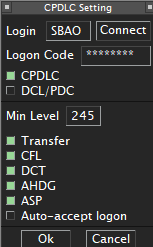
SBAO logon.The datalink is desirable, not essential
Without it the position remains operable: monitoring relies on position reports and separations are the procedural time-based ones. State the unavailability in the controller information and on first contact.
Controller information
One automatic network line plus up to four lines of 76 characters, in English, containing only information needed for the operation. Name, personal data and rating must not be included9.
ATLANTICO CENTER | PROCEDURAL CONTROL | NO RADAR SURVEILLANCE
CPDLC/ADS-C LOGON SBAO | POSITION REPORTS IF NO DATALINK
REPORT: CALLSIGN, POSITION, TIME, LEVEL, NEXT POSITION/ETO, ENSUING
ONLINE UNTIL 2359Z | atc.vatsim.com.br/MOP/oceanico/
Example
2359Z is illustrative; replace it with your expected disconnection time. Without datalink, replace the second line with NO DATALINK | POSITION REPORTS MANDATORY.
Before announcing the position
- Check who is online, especially
SBRE_CTRandSBCW_CTR. - Coordinate the opening with each connected adjacent unit and agree on the transfer point.
- Survey the traffic already inside the FIR or entering within the next 30 minutes.
- Rebuild the picture for those who crossed with no ATC online: ask each one for a position report before issuing any clearance. The procedure is in Operational flow.
- Define the split, if another qualified controller is available.
-
VATSIM, GCAP v2.0, item 6.1. ↩
-
VATSIM, GCAP v2.0, item 6.3. ↩
-
VATSIM, GCAP Designated Positions Overview, AMAS region, VATBRZ division. ↩
-
VATSIM, GCAP v2.0, item 6.1(a). ↩
-
VATSIM, ATC Frequency and Information Management Policy v1.2, item 5.1. ↩
-
AIP-Brasil, ENR 3.5, item 9.2.1. ↩
-
VATSIM, ATC Frequency and Information Management Policy v1.2, items 5.4.2 to 5.4.6. ↩